ScrollLabs Receptionist
In developmentThe receptionist for enquiries that arrive while you work.
A text chat for your website that captures and qualifies each enquiry, hands over to a person when needed, and keeps everything in one inbox for your team to review and follow up. Nothing is sent without someone deciding.
Wattle & Wren Home Cleaning (fictional)
Customer · website chat
Assistant: Hi! Welcome to Wattle & Wren. What type of clean do you need?
Customer: Hi, I need an end of lease clean for a 2 bedroom apartment in Brunswick
Assistant: Got it — an end-of-lease clean, an apartment, 2 bedrooms, in Brunswick. How many bathrooms?
Step 1 of 7
What came of it
- Not yet: Qualified
- Not yet: Question answered
- Not yet: Sample email recorded
- Not yet: In the owner inbox
Run by the same rules engine as the public demo, here in your browser. Sample details only; nothing leaves this page.
What it does
Five jobs, one enquiry at a time.
Each with its status: what the interactive demo already shows, and what is in development.
Capture and qualify enquiries
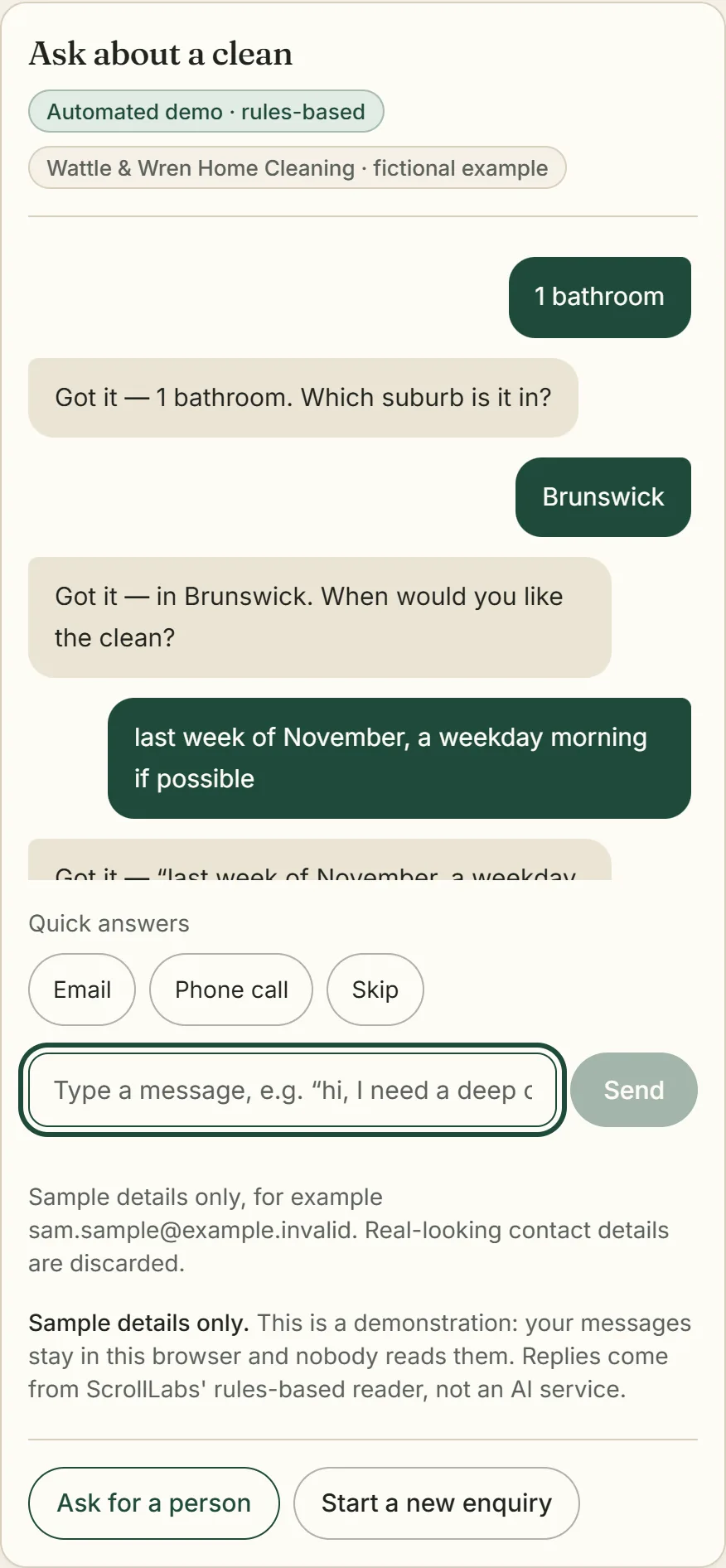
Interactive demoThe chat asks the questions you would ask, one at a time: the job, the property, the suburb, a preferred time and a name. Quick replies for the common answers; a clarifying question when something is unclear.
Hand over to a person
Interactive demoAsk for a person and the chat says so plainly, records how the customer would like to be followed up, and marks the enquiry as waiting for someone. Anything urgent gets safety advice first.
One inbox for the team
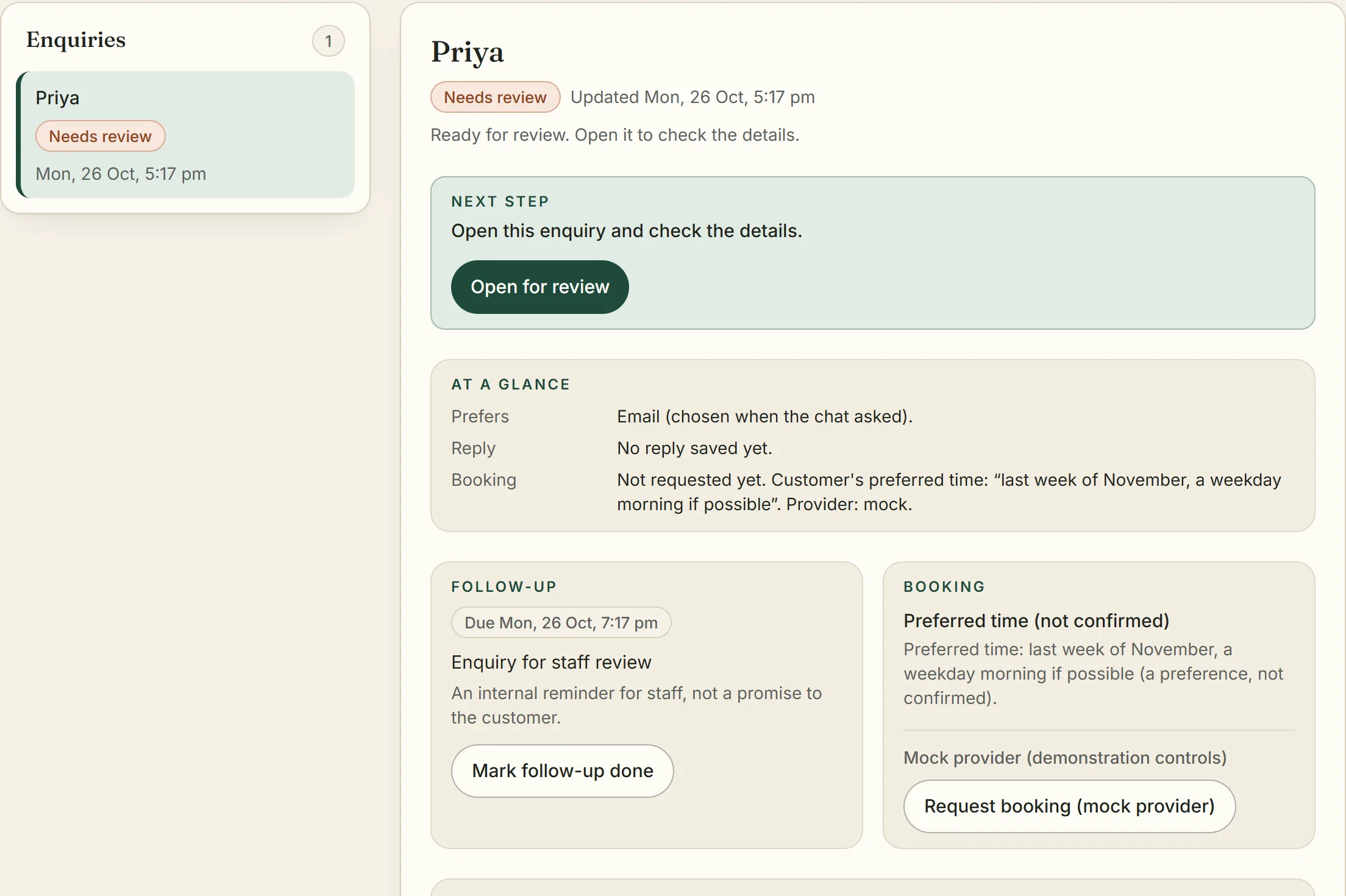
In developmentThe demo shows a browser-local owner view.Every enquiry in one list with its status, what needs attention, and where each detail came from. A shared inbox for several staff, with claims and an audit trail, is being built.
Booking requests, reviewed by you
Interactive demoMock provider in the demo.A preferred time stays a preference. Staff choose a time and request the booking; the business's own calendar confirms it. A Google Calendar connection is in development.
Your services, FAQs and coverage
In developmentBusiness name, services, frequently asked questions, the suburbs you cover and the greeting: set once, so the chat answers the way you would.
From the demo
Two real screens.
Captured from the interactive demo as it runs today. The business, the customer and every detail are fictional.
How it works
Four steps, with a person at the end of every one.
- 1. Website enquiry. The customer types what they need; the chat asks one question at a time and answers approved FAQs.
- 2. Handoff or contact choice. A request for a person pauses the questions. Otherwise the customer chooses email or a phone call, or skips.
- 3. Owner review. The enquiry waits in the owner inbox with its details, what needs attention and a suggested reply to approve.
- 4. Staff follow up. A person emails or phones the customer themselves, from their own email or phone. The product sends nothing.
Step 1: Enquiry
A customer writes in the chat on your website and answers a few short questions.
Step 2: Contact or handoff
They say how they would like to be followed up, or ask for a person and are handed over at once.
Step 3: Owner review
Your team opens the enquiry, sees what is unsure or missing, and edits the suggested reply.
Step 4: You follow up
Staff send the reply from their own email, phone the customer, or request a booking for a time they choose.
Status
Where each part stands.
No client uses ScrollLabs Receptionist yet. The parts marked Interactive demo run on fictional data in your browser.
Enquiry questions
Interactive demoA rules-based text chat on a fictional cleaning business: one question at a time, quick replies, clarification when something is unclear, Victorian suburbs recognised.
Contact preference
Interactive demoEmail, a phone call or skip. A callback wish is a preference for your staff to act on; the product never places calls.
Handing over to a person
Interactive demoOn request the enquiry is marked as waiting for a person, with safety advice first when something sounds urgent. Nobody is notified in the demo.
Owner view
Interactive demoThe enquiry list, status, details with their provenance, what needs attention and what was left open. Browser-local in the demo.
Suggested reply
Interactive demoA draft to edit and approve. Nothing is sent: staff copy it into their own email.
Booking request
Interactive demoStaff choose a time and request a booking from a mock provider. Only the business's own calendar would confirm one.
Shared inbox for several staff
In developmentClaims, an audit trail and a server-side store, behind sign-in. Pilot only.
Notifications
In developmentTell a person by email or webhook when an enquiry needs one. Mock notifier today.
Calendar booking
In developmentA Google Calendar adapter with idempotency checks, not yet connected or verified end to end.
Tenant configuration
In developmentBusiness name, services, FAQs, coverage and greeting per business. One fictional configuration is public.
Real contact capture
In developmentReal customer details for a real business, once the privacy notice is approved. Off until then; the demo filters real-looking details.
Boundaries
What it will not do.
Rules-based, in the browser
The interactive demo follows written rules on a fictional business and calls no outside service. Sample details only.
Nothing sent automatically
The chat does not email, text or call customers. Your team decides every reply and sends it from their own tools.
A text chat, not a phone line
It does not answer or place calls. A customer who prefers a call is phoned by your staff.
No booking without you
The chat never books a job. Staff review each request, and only the business's own calendar confirms it.
Beyond the demo
What is being built, and what is planned.
Status, not promises: none of this is a commitment, and no dates are set.
Shared inbox
Several staff, claims, and an audit trail of who did what.
Notifications
Tell a person when an enquiry needs one, by email or webhook.
Calendar booking
Request a booking in the business's own calendar for a time staff choose.
Tenant configuration
Services, FAQs, coverage and greeting set per business.
Real contact capture
Customers' real details, once the privacy notice is approved.
Reply from the inbox
Send the approved reply without leaving the enquiry.
Confirmations and changes
Confirm, cancel or reschedule a booking from the inbox.
Follow-up reminders
A nudge when an enquiry has waited too long.
Reporting
What came in, what was answered, what was booked.
More integrations
CRMs, other calendars and SMS, as businesses need them.
Ask about ScrollLabs
Ask to be among the first to talk about ScrollLabs Receptionist, or about the free Automation Health Check. No price is set, and nothing starts before scope and price are agreed in writing.
Please leave out passwords and any customer details.
scrolllabs.media@gmail.com